Upload the plans you already have and Wayfinder turns them into a building people can navigate on their phone. No beacons. No hardware. Nothing to install in the building.
Viewing is free and unlimited — you just need an invite from whoever manages the building.
The Problem
Big buildings are hard. Printed signs stop at the lift lobby, the room numbering made sense to whoever laid it out in 1974, and the answer to "where is Meeting Room 4?" is usually a receptionist pointing down a corridor.
The fix on the market is beacons: buy the hardware, install it on every floor, maintain the batteries, repeat in the next building. Most estates never get past the quote. Wayfinder needs a PDF.
How It Works
Three steps, and the longest one is finding the plans.
1
Upload your floor plans
Drop in the vector PDFs you already have — one per floor. No CAD licence, no data prep, no site survey.
2
Wayfinder reads the building
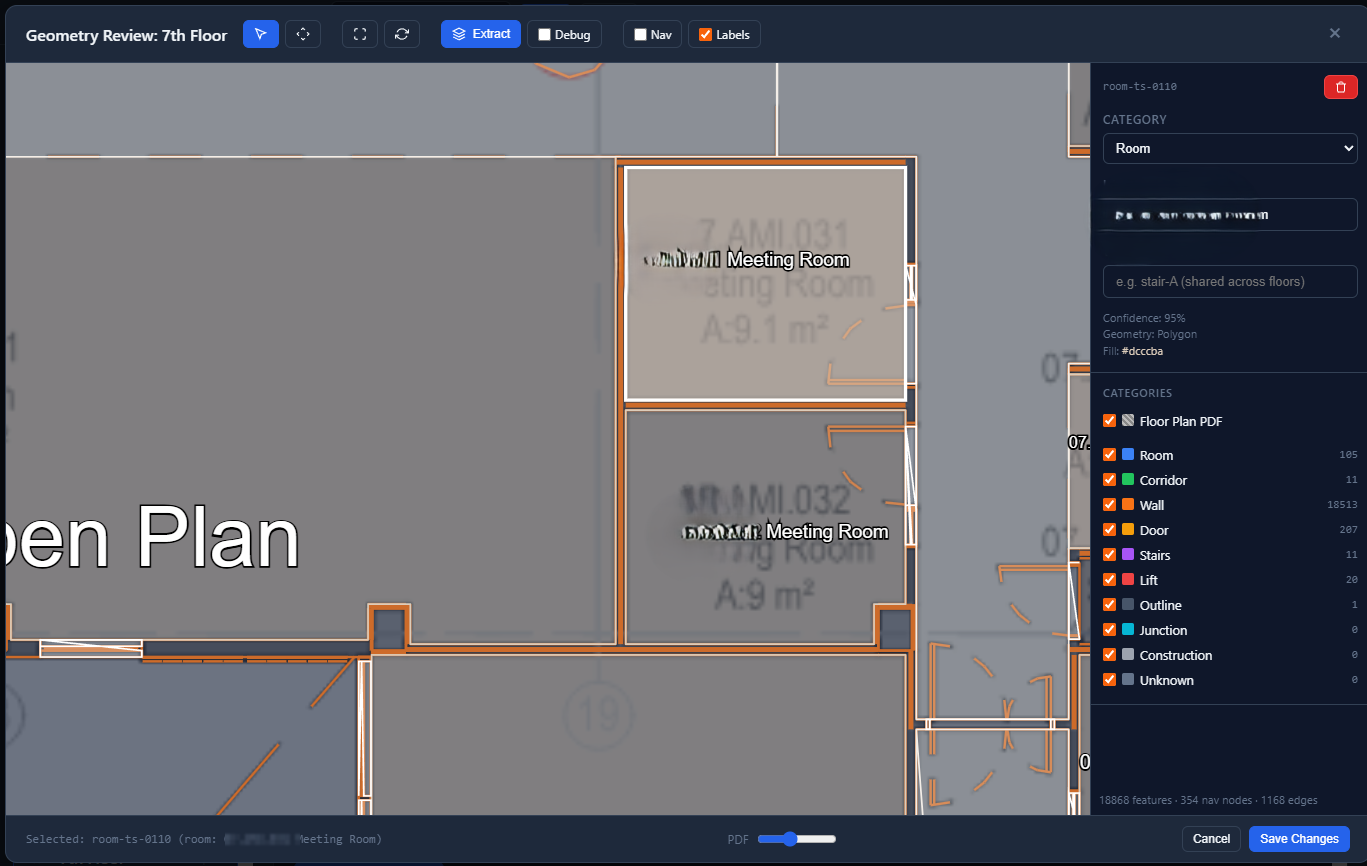
Walls, rooms, doors, stairs and lifts are pulled straight out of the PDF and wired into a navigation graph. No tracing by hand, no per-floor fee.
3
Share the link
Invite your people and they're in. It opens in a browser — no app store, no rollout, and no charge for anyone who's only looking.
Screenshots
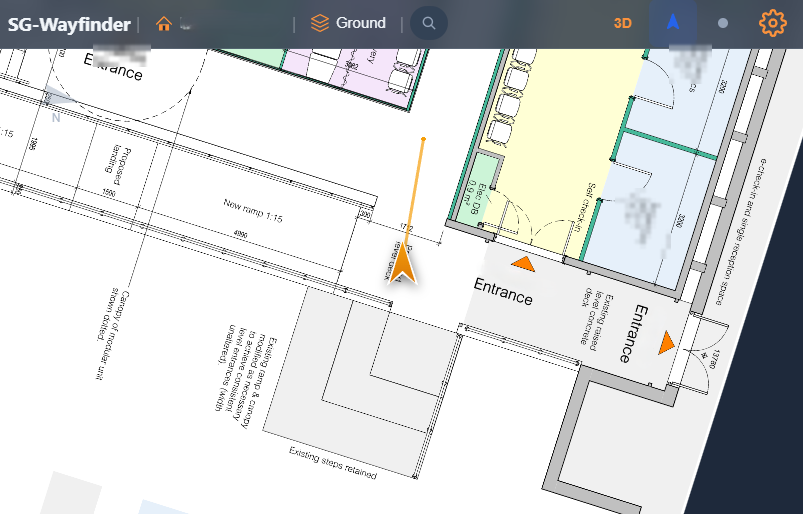
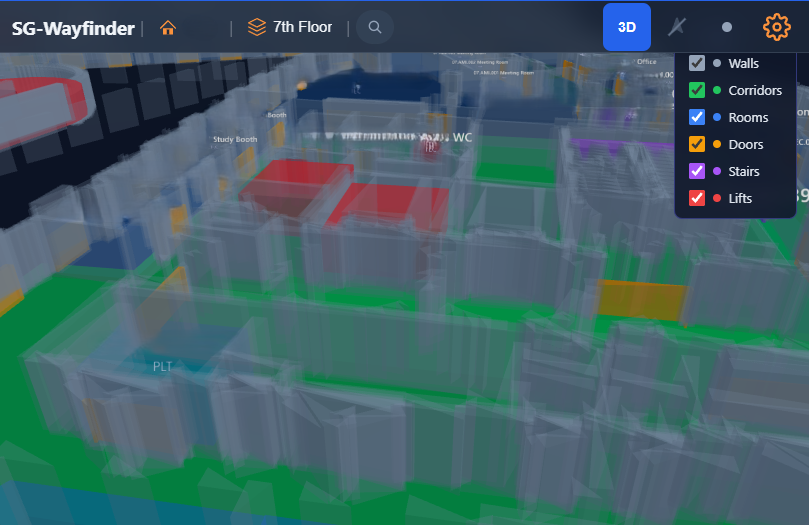
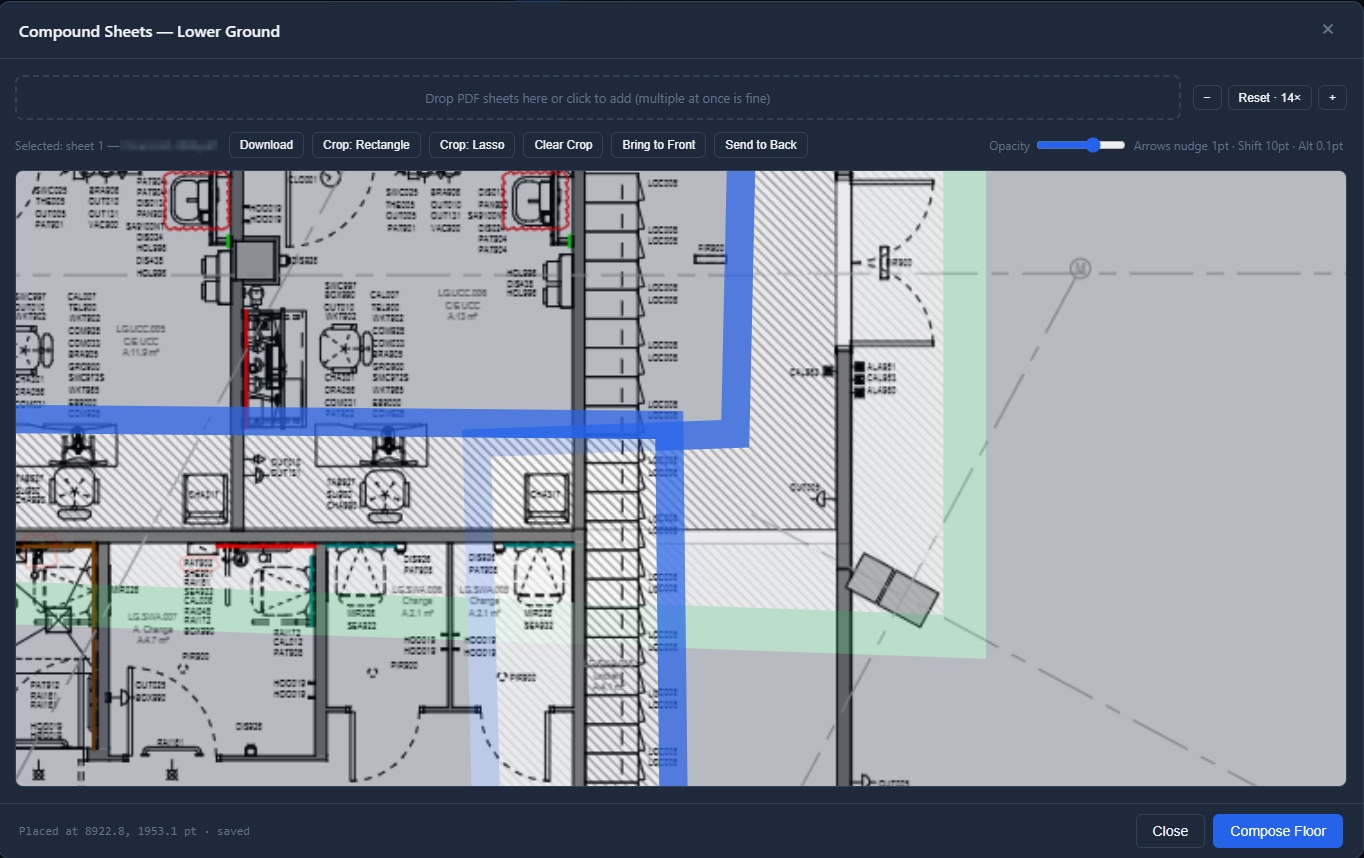
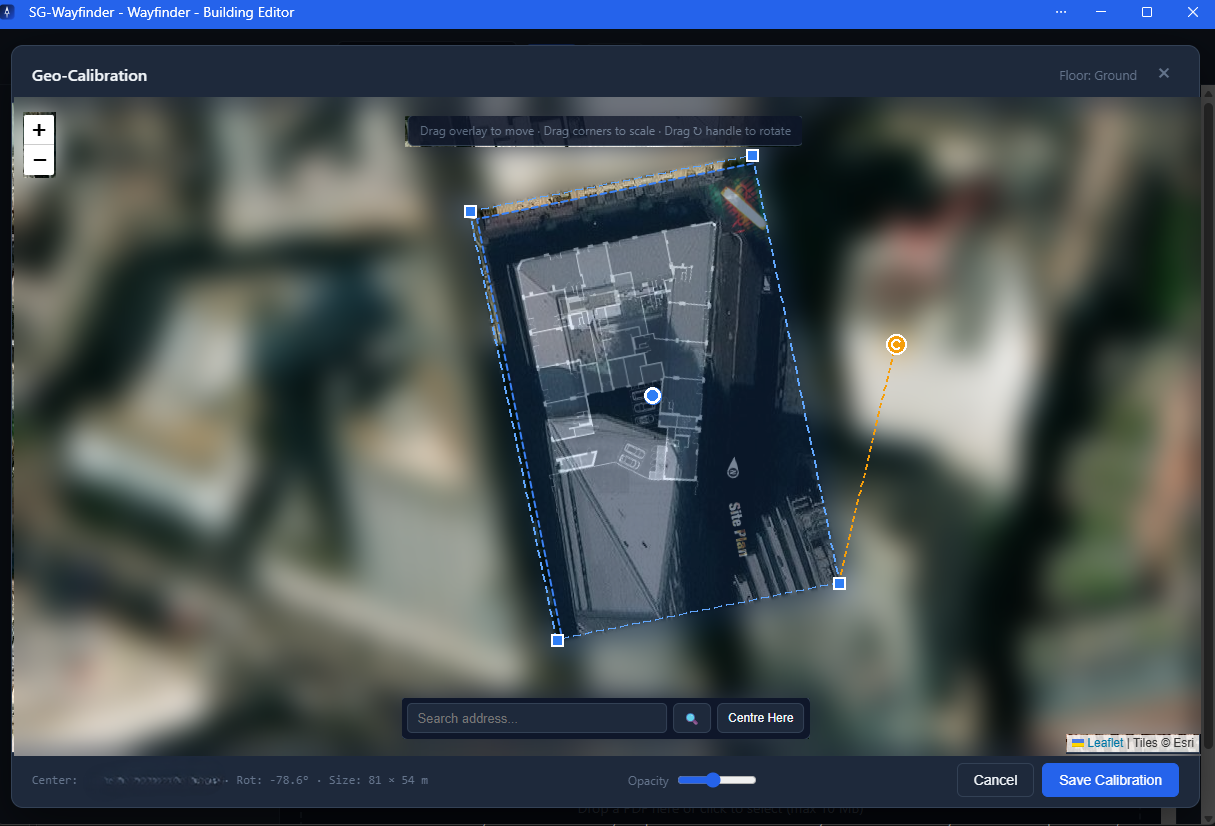
Finding your way. Your position and heading on the floor plan, at whatever zoom you need to read it.The floor in 3D. Walls, corridors, rooms, doors, stairs and lifts render as separate layers, so you can switch off the clutter and see the shape of the place.Extraction, out of a raw PDF. One floor of this building came back as 105 rooms, 11 corridors, 207 doors, 11 staircases and 20 lifts — 18,868 features and a 1,168-edge navigation graph. Every one is reviewable, and correctable, before it goes live.Compound sheets. Big floors arrive as a pile of separate drawings. Drop them in, line them up, crop the overlaps, and compose one floorplan.Geo-calibration. Drag the plan onto the map once, scale it to the building and rotate it to true north. From then on the building knows where it is in the world — which is what lets a phone's GPS put someone on the right corridor.
Features
What's in it today — for the people finding their way around, and the people setting it up.
🧭
Room-to-room routing Beta
Search for a room and get a route to it — across floors, via the lift or the stairs, with the distance and an estimated walking time. Route quality depends on how cleanly a set of plans extracts, so it's in beta while we sharpen that up.
🔎
Search the building
Find a room, office or department by name or room code, and go straight there.
🧊
3D View
See the floor rendered in 3D, with walls, corridors, rooms, doors, stairs and lifts as layers you can switch on and off. Good for getting your bearings before you set off.
📍
Live position indoors
Each floor is pinned to real-world coordinates once, so GPS and your phone's motion sensors can work together and keep a position where GPS alone gives up. Rotate the map to your heading, or keep it north-locked and rotate an arrow instead.
🔍
Pinch-to-zoom (40x)
Smooth touch zoom up to 40x, with pan for both touch and mouse — enough to read the small print on a plan.
📱
Add it to your home screen
It installs as a Progressive Web App and caches the plans you've opened, so a patchy signal in the basement doesn't take your map with it.
🧩
Compound PDF Floorplans
Stitch several detailed PDFs together into one floorplan. Big floors are usually drawn as a set of separate sheets — Wayfinder joins them up, so you navigate the floor rather than the paperwork.
Floors switch with a tap — and on handsets that report altitude reliably, Wayfinder can pick the floor for you.
From PDF to Navigable Building
The extraction pipeline does the work that everyone else quotes you for. It reads the vector geometry in your plans and builds the building out of it.
🧱
Walls and Rooms
Detected from the plan geometry, with names and room codes picked up from the PDF's own text.
🛗
Doors, Stairs and Lifts
Found and connected between floors, so a route can leave one level and arrive on another.
🕸️
A Navigation Graph
Built automatically from what was found. Nothing to trace, no AI to pay for, no cost per floor.
📡
No Beacons. No Hardware.
The competition sells you a BLE install and a maintenance contract. We need a PDF.
Built for Estates
If you look after more than one building, these are the questions you were going to ask on the first call.
🏢
Organisations and Roles
Belong to as many organisations as you need, with a role in each. A Control Panel governs who can author, who can invite, and who can only look.
✉️
Invites That Explain Themselves
Every invite names the organisation it's for, so nobody has to guess which building they've just been added to.
🔑
Your Own Tenancy
An organisation owner runs their own tenancy and can export their own data whenever they want. No hostage-taking.
🇬🇧
Hosted in the UK
Your plans and data are held in Microsoft Azure UK South. It's in section 13 of the Terms, and it's the second thing every buyer asks.
Pricing
One price, per building, per month. That's the whole model.
Free
One Building
Unlimited floors, unlimited authors, unlimited viewers. Free, and it stays free.
Roll it out to a thousand staff and visitors for nothing. The only paid seat is the person who uploads the plans.
No tiers, no cliffs
You pay for the buildings you have, and the price is smooth all the way up. There's no plan to be pushed onto.
Nothing is ever deleted
If a subscription lapses, buildings lock — they don't vanish. Pick the subscription back up and everything is exactly where you left it.
On the Roadmap
Honestly labelled: these are not built yet.
🗣️
Turn-by-Turn Directions
The route already exists — what's coming is the written version. "Left out of reception, lift to floor 3, second door on the right."
📍
Points of Interest
Marked locations for receptions, lifts, toilets, meeting rooms and other key facilities.
♿
Step-Free Routing
Lift-only routes for anyone who can't take the stairs, and a route that says so before you set off.
✍️
Markup Collaboration
Switch it on for a building and let your team annotate the floorplans together — notes, markup and corrections, on the plan itself rather than in an email thread.
Why Wayfinder?
Nothing Goes in the Building
No beacons, no anchors, no batteries, no contractor on site. The entire install is a PDF upload, which means the second building costs the same effort as the first.
Viewing Is Free, Permanently
Wayfinding only works if everyone has it. Charging per user would guarantee it never got used, so we don't.
Your Data Stays Yours
Held in Azure UK South, exportable on demand, and locked rather than deleted if you stop paying.
Frequently Asked Questions
Do I need beacons or any other hardware?
No. Wayfinder positions people using the phone's own GPS and motion sensors against your floor plan. There is nothing to buy, install or maintain in the building.
What if my plans are scans rather than vector PDFs?
Automatic extraction needs vector geometry — it reads the actual lines and text out of the PDF, which a scanned image doesn't have. A scanned plan can still be displayed and navigated, but the rooms, doors and routes have to be set up rather than detected. If you're not sure which sort you've got, send one over and we'll tell you.
Do the people using it need an account?
They need an invite from whoever manages the building, and that's it. Viewing is free and unlimited — there's no per-user charge, ever.
Does it work without a signal?
It installs as a Progressive Web App and caches the plans you've already opened, so you keep your map when the signal drops. Loading a building for the first time needs a connection.
What happens if I stop paying?
Buildings over your free allowance lock. Nothing is deleted, nothing is overwritten, and everything comes straight back when you resubscribe. Your free building carries on as normal.
Who can see my floor plans?
Only people your organisation has invited. Buildings belong to an organisation, roles control who can author and who can invite, and nothing is public by default.
Where is my data held?
Microsoft Azure, UK South region. Section 13 of the Terms of Service has the detail.
How is it billed?
Monthly, on the peak number of buildings you had during that month. Cancel any time — see the Refunds policy.
Tech Stack
ViteTypeScriptPDF.jsThree.jsPWA / Service WorkerGeolocation APIDevice Orientation APIPasswordless Email AuthAzure FunctionsAzure Blob StorageAzure Table StorageAzure Static Web AppsGitHub Actions